


Junk File Rescue
4.34.00 Reviews
App Specs
- Version
- 1.0.3
- Updated On
- License
- Free
- Downloads
- 10,000+
- Developer
- Susan Litwiller Executive NeuroCoaching LLC
- Categories
- Tools
- Platform
- Android
Screenshots
 Analysis by AppCompare
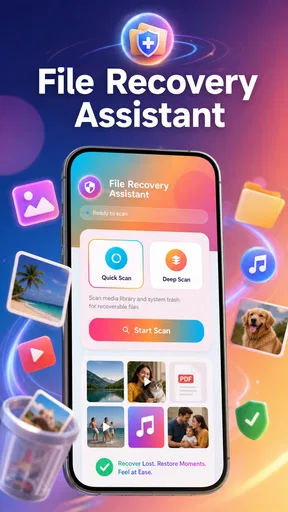
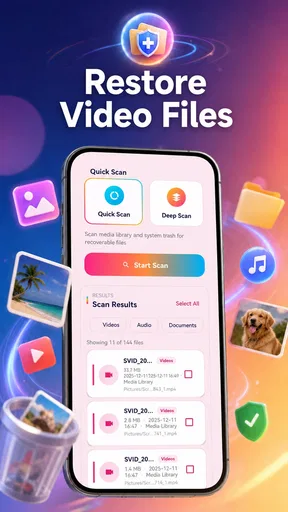
I approached Junk File Rescue as a practical storage tool rather than a miracle recovery service. Its purpose is easy to understand: it scans device storage and helps restore lost photos and videos. That makes it relevant when a gallery item disappears, a folder becomes difficult to locate, or you want a focused way to look for personal media instead of sorting through every file on your phone.
What I like about the concept is its narrow focus. Many storage utilities mix cleanup, file browsing, battery tools, app management, and recovery into one crowded package. This app stays centered on photos and videos, which is useful when the problem is specific. It is a free Android app from Susan Litwiller Executive NeuroCoaching LLC, rated for Everyone, and its current version is 1.0.3. The app has reached over ten thousand installs and holds a 4.3 average from a relatively small group of ratings, so there is some encouraging early feedback without the long track record of a mature recovery suite.
How the current version feels in everyday use
The most sensible way to use this app is as soon as you notice a missing image or clip. I would not wait until the phone has been heavily used afterward. New downloads, camera shots, messaging attachments, and cached media can all make storage harder to interpret, so an early scan gives the app a cleaner situation to examine. This is one of the most important practical lessons with any recovery utility: the sooner you investigate, the less likely it is that ordinary phone activity will complicate the search.
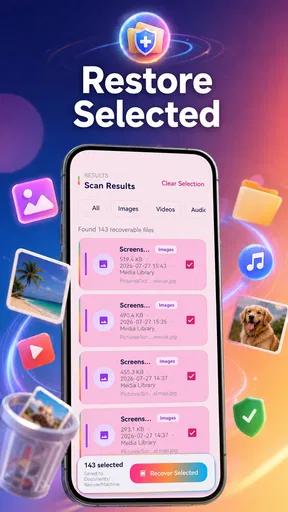
A realistic example would be deleting a set of family photos while trying to free space before a trip. Instead of immediately installing several unrelated cleaners, I would stop creating new media, open Junk File Rescue, and scan the storage for recoverable pictures and videos. I would then review the results carefully before restoring anything. That last step matters because recovery lists can contain duplicates, thumbnails, old copies, or files with unhelpful names. A quick preview and a deliberate selection are safer than restoring everything in one tap.
The app’s storage-scanning approach should also be understood as a search process, not a guarantee. If a file is still present somewhere on the device but no longer appears in the gallery, a scan may be useful. If the file has been overwritten, removed by secure storage handling, or existed only in a cloud account, the situation is different. I would check the phone’s trash folder, the original messaging conversation, and any cloud photo backup before relying on a recovery result. Those alternatives can be faster and more complete than a local scan.
The best habit is to treat recovery as a time-sensitive investigation, not as routine maintenance. I would use the app for a specific missing-media problem, record where restored files are saved, and open a few of them afterward. A file that appears in a result list is not automatically a perfect, usable original. Checking several restored items helps reveal whether the result is complete before you spend time sorting the whole batch.
A focused tool instead of a crowded cleaner
Compared with the usual storage cleaners, this app has a different job. A cleaner normally looks for temporary files, large downloads, duplicate items, or unused applications. That can be helpful for reclaiming space, but it does not necessarily address a missing photograph. Junk File Rescue is more appropriate when the value of the file matters more than the amount of storage recovered.
Worth Reading Before You Choose

EA SPORTS FC Mobile 26 Is a Bigger Football Game, but It Takes Time

Flipboard Shows What News Apps Must Do Beyond the Feed

Switching to Android Auto Means Rethinking Your Driving Routine

Google Calendar Makes a Crowded Week Easier to Manage

Ludo King Makes the Most of the Minutes Between Plans

Baby Panda World Brings Quick Play to Modern Phones, but Its Game Library Feels Busy
It is also different from a full file manager. A file manager is excellent for browsing folders, renaming items, moving media, and checking where a file currently lives. It is less specialized when a picture is no longer visible through normal browsing. I would use a file manager first when I suspect the image was moved, renamed, or placed in an unfamiliar folder. I would turn to this app when the ordinary folder search has not answered the question.
Cloud backup is the stronger alternative when it was already enabled and synchronized. It usually preserves a clearer timeline and may offer a trash or recently deleted area. The trade-off is that cloud recovery depends on the account and synchronization history, while a storage scanner works on the device itself. For private media that never reached the cloud, local scanning can be the more relevant route. For media that was already backed up, the cloud service is usually the cleaner first choice.
What the release information tells existing users
The current release is version 1.0.3, and the app was released on July 30, 2026. That places it in an early stage of its product life rather than among long-established recovery brands. I see that as both a reason to try it cautiously and a reason to watch its development. An early tool can have a simpler interface and a clearer purpose, but it may also need more refinement around unusual storage layouts, result organization, and recovery guidance.
For someone already using it, the important point is not to assume that a version number alone changes the underlying recovery outcome. A newer build can improve scanning behavior, stability, or the way results are presented, but it does not change the physical condition of storage. If a file has been overwritten, an update cannot bring back the original data. I would keep expectations tied to what remains on the device and use the latest available version mainly to benefit from the app’s ongoing maintenance.
The early audience size gives the app some visibility, but it also means personal testing still matters. A phone with a removable storage card, a phone with mostly internal storage, and a phone that handles media through messaging applications may produce very different experiences. Before scanning a large device, I would try the workflow with a small, non-critical search and make sure I understand where restored items go. That is a better safeguard than assuming another person’s successful recovery will translate exactly to my phone.
The developer, Susan Litwiller Executive NeuroCoaching LLC, is now associated with a tool that deals with highly personal material. That makes clarity especially important. When using any recovery app, I want to know which results are local, which files are being acted on, and whether the app distinguishes a full photo from a preview image. I would read each on-screen instruction rather than approving actions automatically, particularly when the scan returns a long list of similarly named media.
Small workflow choices that make a big difference
My first practical tip is to separate discovery from restoration. During the initial scan, I would note the number of plausible results and inspect a few samples. Only after that would I select the files I truly need. This reduces the chance of filling the phone with duplicates and makes it easier to identify whether the app is finding original media or fragments and previews.
My second tip is to prepare a destination before beginning. If the device is nearly full, restoring a large video back onto the same storage can create a new problem. I would remove only clearly disposable material first, or use another available location when the workflow allows it. I would also avoid editing or compressing recovered files immediately. First preserve the result, then organize it after confirming that it opens correctly.
A third useful approach is to search by event rather than by filename. Camera filenames can be meaningless, while a recognizable scene, approximate time, or video length can help identify the right item. I would restore one representative file from a group before selecting the rest. If that sample is damaged or unexpectedly small, there is little value in restoring the entire group blindly.
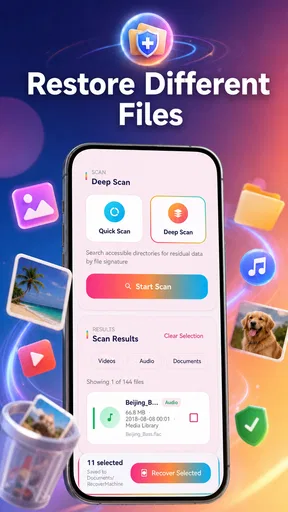
There is another trade-off that is easy to miss: a broad scan may be more thorough, but it can also produce more noise. A focused search is easier to review when the missing item is recent and you remember its location. A broader approach makes more sense when the folder is unknown, but it demands patience. I would choose the narrower path first and expand only if the results do not match what I remember.
Where the app still needs careful handling
The main limitation is inherent to local recovery tools: scanning cannot promise that every lost file will return in its original condition. Photos and videos may be represented by incomplete remnants, duplicates, or low-value previews. That means the app is not a replacement for a backup system. If the images are irreplaceable, I would use this as one recovery attempt while also checking the device’s normal deletion area, cloud accounts, computer transfers, and messaging apps.
I would also skip it when my real problem is storage management rather than lost media. If I simply need to remove large videos, identify duplicate downloads, or understand which applications consume space, a dedicated storage analyzer will usually be more suitable. This app’s purpose is too specific for general cleanup. Using it as a daily cleaner could make the phone-maintenance process feel less direct.
Users who want extensive controls may find the early, focused design limiting. For example, someone managing several storage locations or a large professional media library may prefer a mature file-management and backup workflow with clearer folder tools. Junk File Rescue makes more sense for a personal device and a concrete recovery task than for systematic archiving.
Privacy-conscious users should approach the scan deliberately. Photos and videos can include sensitive documents, family moments, location clues, or private conversations saved as images. I would avoid casually restoring everything, keep recovered files organized, and remove unwanted copies after checking them. The Everyone age rating makes the app broadly accessible, but that does not make every recovered item suitable for every person who uses the device.
Who should use it and who should look elsewhere
I would recommend trying it to someone who has lost personal photos or videos on an Android device and wants a free, focused first step. It is especially reasonable for a person who has already checked the gallery’s deleted area and cannot find the item through normal folders. The simple premise is easier to act on under stress than a large utility with many unrelated menus.
I would be more hesitant to recommend it as the only plan for important files. Anyone handling work footage, legal records, medical images, or a large family archive should have a backup routine before a recovery problem occurs. A cloud service, computer backup, or external copy protects against situations that a device scan may not solve. Recovery software is a safety net; it is not the same as prevention.
I would also point users toward their cloud provider first when synchronization was active. That route may preserve the original organization and offers a better chance of finding a recently deleted item in context. Conversely, when the media was never synchronized or the missing files were created locally, a storage scan is more relevant. The right choice depends less on the app’s category than on where the file existed before it disappeared.
What I would watch as the app develops
Because version 1.0.3 belongs to an early product phase, I would watch for improvements that make results easier to trust rather than simply adding more buttons. Clearer separation between full files and previews, better grouping of duplicates, understandable save locations, and useful recovery status messages would all make a practical difference. These details determine whether a scan saves time or creates another sorting job.
I would also look for stronger guidance around failed recovery attempts. A helpful tool should make it obvious when an item is only partially recoverable and should encourage users to preserve recovered files safely. Better explanations would help people distinguish a missing gallery entry from genuinely deleted storage content, which is one of the most confusing parts of this category.
The current rating of 4.3 is encouraging, while the relatively limited review base means I would treat it as an early signal rather than a final verdict. The app’s free price lowers the barrier to testing it, and its Everyone rating makes it accessible to a wide audience. Still, I would judge it by the quality of the results on my own device, not by the rating alone.
My final take after weighing the trade-offs
Junk File Rescue is worth keeping in mind when a photo or video has vanished and ordinary gallery recovery has not helped. Its focused role is its strongest quality: it gives a user one clear place to begin instead of forcing them through a complete storage-management suite. The free entry point also makes a cautious trial reasonable.
My recommendation comes with a firm condition: use it promptly, review results individually, and do not confuse a scan with a guarantee. Check backups and deleted folders first when they are available, preserve successful recoveries somewhere safe, and avoid using the app as a substitute for regular backups. For a simple personal recovery attempt, I think it is a sensible tool to try. For critical archives or general device cleanup, a backup service, file manager, or storage analyzer will be the better choice.
In short, I see this as a focused first response to lost local media, not a complete data-protection strategy. Its early release status leaves room for growth, but the current purpose is clear enough to be useful when the problem is specific and the user approaches recovery carefully.
Pros
- Quickly identifies cache
- residual files
- and other removable clutter.
- Simple interface makes cleanup accessible for less experienced users.
- Preview options help review files before deleting them.
- Can free storage space without requiring advanced technical knowledge.
- Useful for spotting large or unnecessary files in one place.
Cons
- Some recommended deletions may require careful manual review.
- Cleaning results can vary depending on Android version and device brand.
- Frequent ads may interrupt the cleanup process on the free version.
- Deep scanning may take longer on devices with extensive storage.
- Deleting app data by mistake could remove saved settings or offline content.
FAQs for Junk File Rescue
What is Junk File Rescue and what does it do?
Junk File Rescue is designed to help users identify and remove unnecessary files that may occupy storage space on an Android or iOS device. Depending on the version you install, it may scan temporary files, cached data, leftover installation files, duplicate items, or other storage categories. Before deleting anything, review the results carefully because some files may still be useful to you.
Is Junk File Rescue safe to use on my phone?
The app can generally be used safely when downloaded from an official app store and granted only the permissions it genuinely needs. However, storage-cleaning tools often require access to files, photos, or device information to perform scans. Read the permission requests and privacy policy before continuing, and avoid approving access that seems unrelated to the app’s cleaning features.
Can Junk File Rescue improve my phone’s performance?
Removing unnecessary files may free storage and can make a device feel less cluttered, particularly when available space is very low. Nevertheless, Junk File Rescue cannot guarantee a major speed improvement, since performance also depends on the phone’s hardware, operating system, background apps, battery condition, and available memory. Treat it primarily as a storage-management utility.
Will Junk File Rescue delete my photos, videos, or important documents?
A reputable cleaner should separate removable junk from personal files, but users should never rely on automatic selection without checking the scan results. Photos, videos, downloads, messaging attachments, and documents may sometimes appear in categories such as large files or duplicates. Review every proposed item, deselect anything important, and create a backup before performing a large cleanup.
Is Junk File Rescue free, and does it include subscriptions or advertisements?
The available features, advertisements, and payment terms may vary according to the platform, country, and app version. Some cleaning applications provide a free scan while reserving automatic cleanup, advanced tools, or an ad-free experience for premium users. Before downloading or starting a trial, check the store listing for in-app purchases, recurring subscription details, cancellation instructions, and refund conditions.


